



Key Takeaways
- You can transfer your US stocks from Paasa to Vested via ACATS.
- To initiate the transfer, you have to request it from Vested by navigating to share transfer and then select “Transfer from Another Broker” and then enter the asked details to proceed.
- Vested charges no fees for incoming transfers. However, your current broker may charge. So, make sure you understand the charges before proceeding.
- The transfer takes around 5 to 7 business days, and until then, it is advisable not to place any new trades in either account.
- You cannot transfer fractional shares, as they cannot be transferred. So it is better to decide before whether you want to sell them or keep them.
- Make sure to enter your details (name, account type, DOB, address, and account number) correctly to avoid a failed transfer.
- Cost basis usually doesn’t transfer automatically, so add it manually in the Vested app after the transfer.
| Quick answer: You can move your US stocks from Paasa to Vested without selling them via an in-kind ACATS transfer which you initiate from the Vested app (Transfer & Wallet > Transfer from another broker > Interactive Brokers). Vested charge no fee on incoming transfers and it normally takes 5-7 business days. Only whole shares are transferred (fractional shares are sold or left behind). An in-kind transfer is not a sale so there’s no capital gains tax and your holding period is carried forward from the date you originally purchased the shares. |
If you are planning a Paasa-to-Vested transfer of US stocks, you don’t have to sell your existing investments or start from scratch. You can move your existing shares directly from Paasa to Vested via the ACATS (Automated Customer Account Transfer Service).
ACATS lets you transfer your US stocks without selling them. Your holding period will remain linked to the original purchase date. Once the shares arrive in your Vested account, you’ll need to enter their original purchase prices (cost basis) manually in the app’s transaction history section. Vested doesn’t fetch this automatically, so keep your IBKR statement handy.
In this guide, we’ll learn the step-by-step process to move US stocks from Paasa to Vested, the documents you need, applicable charges, transfer timelines, and tax implications.
How the transfer works
A Paasa ACATS transfer allows you to transfer US stocks directly from your Interactive Brokers (IBKR) account to Vested without selling them. To do this, start an in-kind transfer through the Vested portal using the Automated Customer Account Transfer Service (ACATS).
| Paasa | Vested | |
| Underlying broker | Interactive Brokers (IBKR) | DriveWealth, via VF Securities, Inc. |
| Account holder | Your own name | Your own name |
| Role in the transfer | Delivering (sending) side | Receiving side |
Your account with Paasa is held directly with Interactive Brokers in your name and linked to your PAN.
On the other hand, Vested mainly uses DriveWealth, LLC to handle the clearing and execution of US stock trades.
The transfer itself runs on ACATS (Automated Customer Account Transfer Service), the electronic system operated by the National Securities Clearing Corporation.
Under ACATS, the receiving broker starts the request, which means you initiate the move from Vested, not from Paasa. Vested supports three standard US transfer methods: ACATS, DTC, and DRS. The method used depends on your sending broker and the type of assets, and Vested picks it automatically when you select your broker in the app.
Before you begin: a quick checklist
Before you begin the transfer request, make sure to go through the checklist below to avoid failed transfers:
- Open and fully verify your Vested account: KYC must be completed before you request an incoming transfer.
- Match your details exactly: Your name, PAN-linked identity, and account type (individual or joint) must match on both platforms.
- Find your underlying IBKR account number: This is not always the number you see on the Paasa home screen. You can find your full account number by logging in to the Interactive Brokers Client Portal and navigating to Account Settings > Account Information.
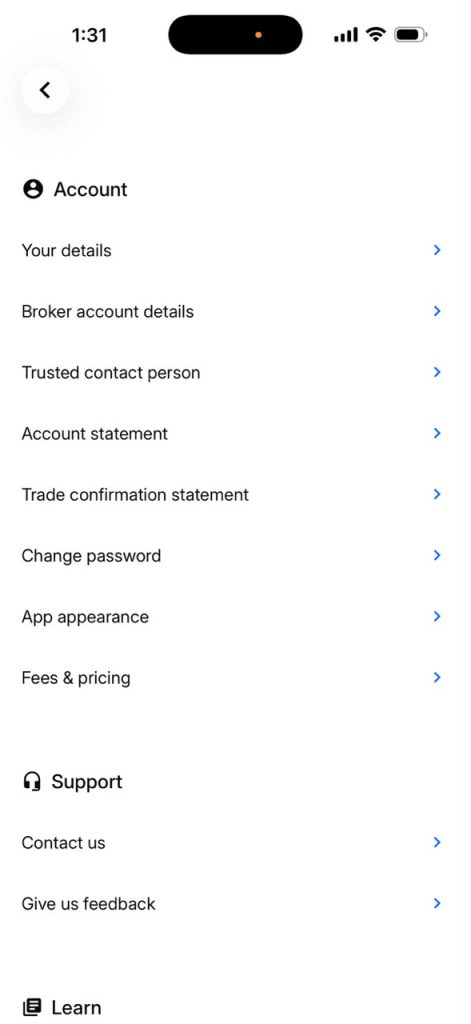
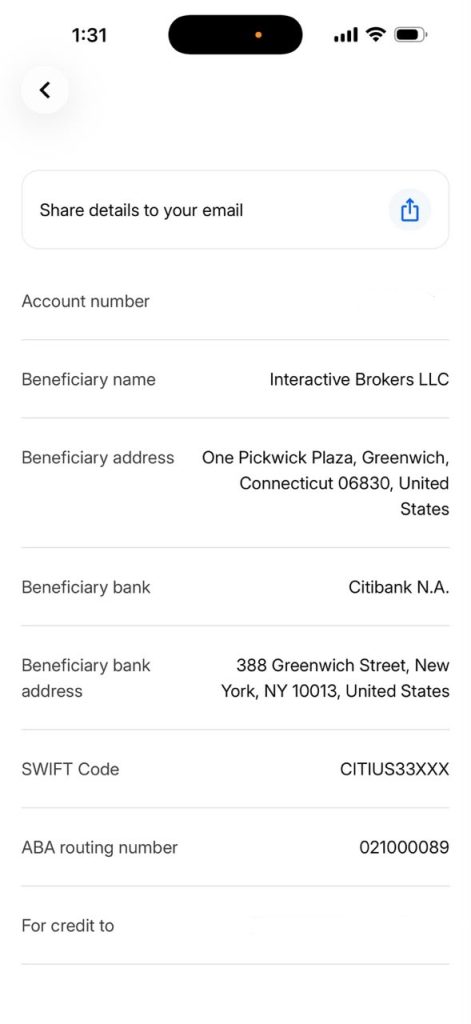
- Download a recent statement: An IBKR-generated activity or account statement shows your account number and holdings.
- Deal with fractional shares: Only whole shares move over ACATS. Decide whether to sell the fractional part first or round up to a whole share.
- Cancel open orders: Pending limit or stop orders can block the transfer, so make sure to clear them before you start.
- Note your cost basis: Download a holdings report from IBKR showing each purchase date and price. You’ll need it to enter your cost basis on Vested after the transfer.
Full vs. partial transfer: Which one should you choose?
Choosing between a full and partial transfer depends on how much of your portfolio you want to move from Paasa to Vested.
- Full transfer: Moves all eligible stocks and your cash balance to Vested. Choose this option if you want to move your entire portfolio and close your Paasa account.
- Partial transfer: Moves only the stocks or cash you select. Choose this option if you want to keep some investments in Paasa or leave behind fractional and unsupported shares.
Key differences
| Feature | Full transfer | Partial transfer |
| Assets moved | All eligible stocks and cash | Only selected stocks or cash |
| Fractional shares | Cannot be transferred | Can be left behind |
| Unsupported assets | Must be left behind or sold | Can remain in Paasa |
Steps to transfer US stocks from Paasa to Vested
1.Log in to your Vested account: The first step is to log in to your Vested account using your registered email ID.
2.Go to transfers: Navigate to “Transfer & Wallet” and then select “Transfer from Another Broker.”
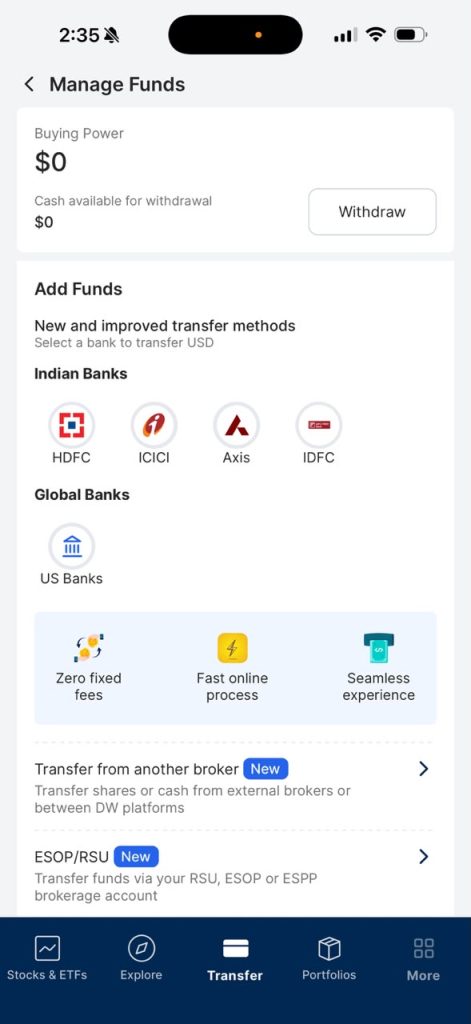
3. Select broker: Choose “Interactive Brokers” and enter the required details.
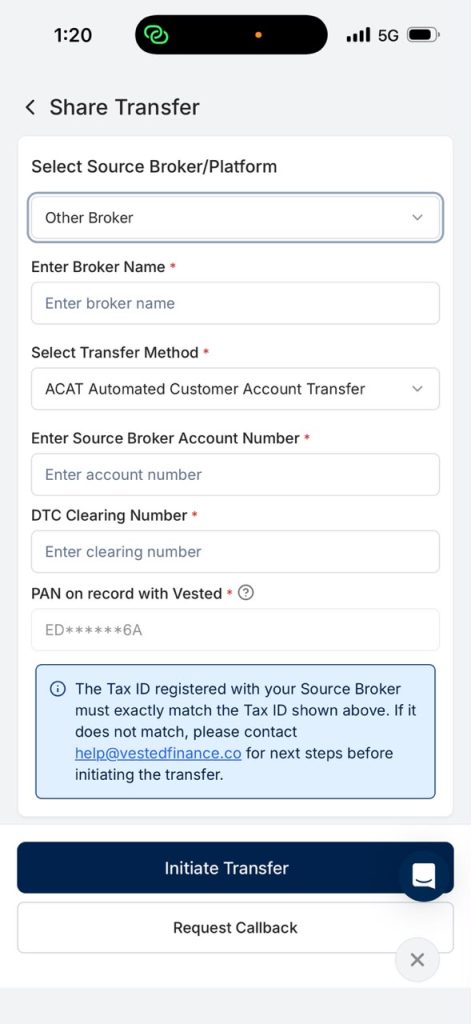
4.Enter account details: Enter the account details requested on the screen. Please note that IBKR might charge a fee of 75-100 USD for outgoing ACAT transfers. Ensure you have sufficient balance in IBKR before initiating the transfer, or it will be rejected
5. Click the Submit Request button: After entering your details, follow the on-screen instructions and click Submit to send your transfer request.
Important rules and things to keep in mind
- Only whole shares can be transferred: You can only transfer whole shares to Vested and cannot transfer fractional shares. You can either sell them before transferring from your Paasa account or leave them behind.
- No capital gains tax on in-kind transfers: When you move shares from one financial institution to another, you don’t pay capital gains tax because ownership doesn’t change, only the broker changes.
- Avoid trading during the transfer: Once you request a transfer, it’s advisable not to trade in either your Paasa or your Vested account until the transfer is complete.
- Transfer timelines: The transfer of shares takes around 5 to 7 business days.
Tax and cost basis for Indian investors
An in-kind transfer is generally not a sale, because you own the same shares before and after the transfer; only the custodian changes. So your long-term capital gains holding period continues from the original purchase date.
Vested receives your cost basis (original purchase price) from IBKR within 15 days of the transfer date and updates it in your account automatically. Until then, it’s advisable not to sell the transferred shares.
A few things to keep in mind:
- Fractional shares are an exception: Under ACATS, you can not transfer fractional shares, so IBKR sells any fraction before the transfer. In India, it is taxed, and you must report it when filing your ITR.
- Keep your own records: Update your cost basis on Vested. In most cases, cost basis isn’t transferred with the shares. Once the transfer completes, go to the transaction history section in the Vested app and enter the original purchase price for each holding, using your saved IBKR statement. Keep that statement as your record for computing gains when you sell.
- Schedule FA still applies: As an Indian resident, you must disclose all your foreign holdings in your income tax return. In the year of transfer, you may need to show the account at IBKR and the account at Vested.
- No new LRS remittance: Moving shares between brokers is not a fresh outward remittance, since no money leaves India.
Note: Tax rules depend on your situation, so check the treatment with a chartered accountant before you file.
Why transfers get rejected, and how to avoid it
A rejected ACATS request does not put your shares at risk, but it does cost you time. The most common causes are simple to prevent.
| Problem | How to avoid it |
| Name mismatch | Use your legal name, spelled correctly, on both accounts |
| Wrong account number | Copy the IBKR number from a statement, not from the Paasa home screen |
| Account type mismatch | Make sure both accounts are the same type. An individual account can only transfer to an individual account, and a joint account to a joint account with the same holders. |
| Tax ID mismatch | Make sure the same PAN-linked identity is on file at both brokers |
| Unsupported assets | Remove non-US and UCITS holdings from a partial transfer |
Why move to Vested?
- US stocks and ETFs: Vested gives you direct access to more than 10,000 US stocks and ETFs listed on the NYSE and Nasdaq. You can invest in global companies such as Apple, Amazon, Microsoft, and Tesla.
- Fractional investing from $1: Start investing in expensive stocks such as NVIDIA and Amazon with as little as $1.
- US stock SIPs: Set up regular investments in US stocks and ETFs through SIPs.
- Tax reports: Access tax documents such as Form 67, Schedule FA, FSI and TR details, and Form 1042-S to help with your Indian tax filing.
- Regulated investment platform: Vested offers securities through VF Securities, Inc., a FINRA and SIPC member. DriveWealth acts as the clearing firm and custodian. SIPC protection covers up to $500,000, but it does not protect you against market losses.
- Managed Portfolios: Managed Portfolios offer ready-made baskets of US stocks, global equities, bonds, and ETFs.
- Global Funds: Vested offers Global Funds through UCITS funds. These are actively managed funds based in Europe and managed by global investment firms such as BlackRock, Goldman Sachs, Fidelity, Morgan Stanley, PIMCO, Vanguard, and Franklin Templeton.
Final thoughts
Transferring your US shares from Paasa to Vested includes three important steps. First, raise a request from your Vested account for a transfer, then enter the correct IBKR account details and update the cost basis once you receive the shares in your Vested account. Before proceeding, make sure your account details are correct and check if there are any fractional shares, because fractional shares cannot be transferred. The transfer can take around 5 to 7 business days.
Frequently Asked Questions (FAQs)
Can I transfer my US stocks from Paasa to Vested without selling them?
You can transfer your US stocks/ETFs to your Vested account via an in-kind ACATS transfer by initiating the request from the Vested app.
Does Paasa or Interactive Brokers charge a fee to transfer stocks to Vested?
Vested does not charge any fees for incoming transfers. However, your current broker may charge a fee to transfer your assets. You can check the applicable charges before confirming the transfer request.
Is transferring US stocks from Paasa to Vested taxable in India?
No, transferring US stocks from Paasa to Vested is not taxable because an in-kind transfer isn’t a sale; only your broker changes.
How long does it take to transfer stocks from Paasa to Vested?
The transfer can take around 5 to 7 business days.
What is an ACATS transfer and how does it work for Indian investors?
ACATS is the US system which moves securities between brokers without selling them. You initiate the request from Vested, enter your IB account details and the shares move in kind into your Vested account. Vested supports ACATS, DTC and DRS and will choose the method for you when you select your broker.
Does Vested charge for incoming transfers?
No, Vested don’t charge any fee for incoming share transfers. Your sending broker may well charge for the outgoing transfer so be sure to check.
Will the transfer reset my holding period or cost basis?
No. An in-kind transfer is not a sale so your holding period carries on from the date you originally purchased the shares. Vested will receive your cost basis from IBKR within 15 days of the transfer date and will update it. You’ll need to have your IBKR statement to hand and if at the end of that period any holding has no cost basis then you’ll need to enter in the original purchase price in the transaction history section of the Vested app.
Can I transfer my fractional shares from Paasa to Vested?
No. Only whole shares move over ACATS. You’ll need to sell the fractional part prior to the transfer or else it will be left behind. The sale of the fractional part will be taxable in India and will need to be reported in your ITR.
Can I transfer just some of my shares?
Yes, a partial transfer will only move the stocks or cash that you choose and allows you to keep your other investments in Paasa or leave your fractional and unsupported shares behind.
Why was my Paasa to Vested transfer rejected?
The most frequent reasons for a rejection are a name mismatch, the wrong IBKR account number, an account type mismatch (individual versus joint) and a tax ID mismatch. A rejection in no way puts your shares at risk. Simply correct the detail and resubmit the request via the Vested app.
Do I need to report the transfer in my income tax return?
Yes, you still have to disclose foreign holdings on Schedule FA. In the year of transfer, you may well be required to show both the IBKR and Vested accounts. Check the treatment with a chartered accountant.
Does the transfer count against my LRS limit?
No. Moving shares between brokers is not a fresh outward remittance as no money leaves India.
What can I do on Vested following the transfer?
You can invest in 10,000+ US stocks and ETFs, buy fractional shares from $1, set up SIPs, download your tax documents (Form 67, Schedule FA, FSI and TR), explore Managed Portfolios and Global Funds.